In most cases, Airmonitor Plus will power on automatically when connected to a 5V/2A USB power supply using the supplied USB-C cable.
If it doesn't power on automatically:
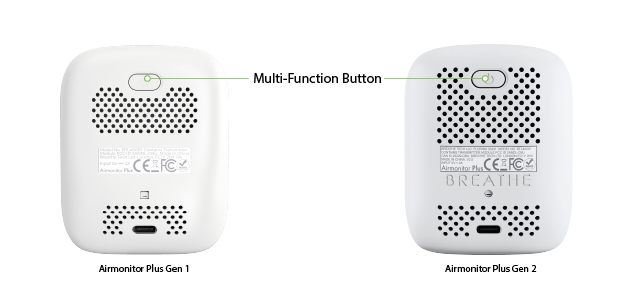
- Locate the multifunction button on the rear of Airmonitor Plus.
- Press and hold the button for approximately 3 seconds.
- Release the button when the display lights up.
Airmonitor Plus will begin monitoring your indoor air quality immediately after powering on.
First Time Setup
Before taking your first readings, we recommend:
- Fully charge Airmonitor Plus.
- Calibrate the CO₂ sensor outdoors in fresh air.
- Connect Airmonitor Plus to Wi-Fi if you want to use the Breathe Tech app and cloud features.
Once these steps are complete, Airmonitor Plus is ready for everyday use.
If Airmonitor Plus Doesn't Turn On
- Connect Airmonitor Plus to a 5V/2A USB power supply using the supplied USB-C cable.
- Allow it to charge for at least 30 minutes.
- Press and hold the multifunction button for approximately 3 seconds.
If Airmonitor Plus still doesn't power on, please contact Breathe Tech Support and we'll be happy to help.
Was this article helpful?
That’s Great!
Thank you for your feedback
Sorry! We couldn't be helpful
Thank you for your feedback
Feedback sent
We appreciate your effort and will try to fix the article