Airmonitor Plus can be connected to Home Assistant, allowing you to take advantage of its local control, automations and integrations.
How to Set It Up
Step 1 – Add your monitor to the Smart Life app
Install the Smart Life app, create an account and add your Airmonitor Plus device.

Step 2 – Open Home Assistant
Install the Home Assistant app on your tablet or phone, or open http://homeassistant.local:8123 in your browser.
Step 3 – Go to Devices & Services
Log in to your Home Assistant account and choose Settings > Devices & Services.
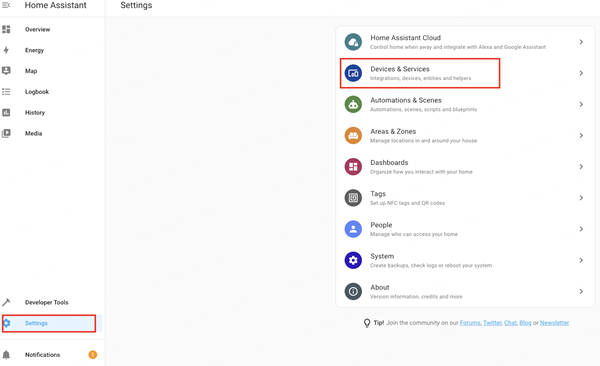
Step 4 – Install the Tuya integration
Click the Integrations tab and search for Tuya, then click the icon to install it.
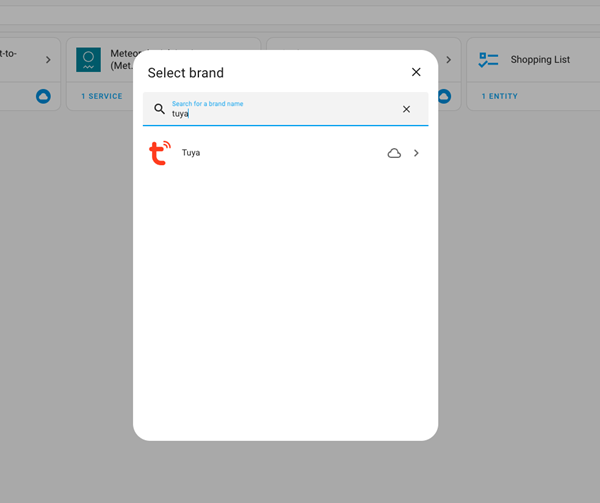
Step 5 – Enter your user code
In the pop-up window, enter your user code.
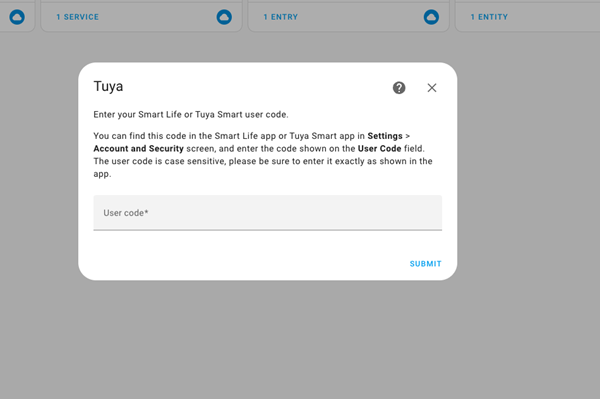
To find your user code:
- Open the Smart Life app.
- Tap Me in the bottom right corner, then tap the settings icon in the top right corner.
- Choose Account and Security > User Code.

Step 6 – Scan the QR code
Open the Smart Life app, tap the + (plus sign) in the top right corner and tap Scan. Scan the QR code and click SUBMIT to complete the connection.

Frequently Asked Questions
Do I need Home Assistant to use Airmonitor Plus?
No. Home Assistant integration is completely optional. Airmonitor Plus works independently using the Breathe Tech app. See Breathe Tech App System Requirements.
Can I create automations?
Yes. Home Assistant allows you to use Airmonitor Plus sensor readings as triggers for automations, depending on your Home Assistant configuration.
Will my historical data appear in Home Assistant?
Home Assistant displays the sensor data it receives through the integration. Historical charts and long-term statistics depend on your Home Assistant configuration and recorder settings. Your history is also available in the Breathe Tech app. See Viewing Data Points on App Graphs.
Is Home Assistant supported by Breathe Tech?
Breathe Tech provides compatibility through the Tuya integration. As Home Assistant and Tuya are continually updated, available features and supported entities may change over time.
Related Articles
Was this article helpful?
That’s Great!
Thank you for your feedback
Sorry! We couldn't be helpful
Thank you for your feedback
Feedback sent
We appreciate your effort and will try to fix the article