The Breathe Tech app is available free for both iPhone and Android devices. While your Airmonitor Plus can be used on its own, installing the app unlocks additional features including historical graphs, smart alerts, cloud data storage, and data export.
Download the App
You can install the Breathe Tech app in one of three ways:
Option 1 – Scan the QR Code
Scan the QR code below, it is also included in your User Guide and on the product packaging, using your phone or tablet's camera.
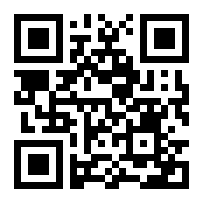
Option 2 – Search the App Store
Search for Breathe Tech in:
- Apple App Store
- Google Play Store

Option 3 – Download Directly
Use the direct download link; https://qrplanet.com/43slim

Create Your Account
After installing the app:
- Open the Breathe Tech app.
- Tap Create Account if you're a new user.
- Enter your email address and create a password.
- Check your email for a verification code and enter it in the app.
- Sign in to your new account.
If you already have an account, simply tap Log In and enter your existing email address and password.
What's Next?
Once you're signed in, you're ready to connect your Airmonitor Plus to Wi-Fi and begin monitoring your indoor air quality.
Need Help?
If you're unable to find the app:
- Make sure your device meets the minimum system requirements (Android v6.0 or later, iOS v13.0 or later)
- Confirm you're searching for Breathe Tech.
- Check that your device has an internet connection.
If you're still having trouble installing the app, please contact our support team and we'll be happy to help.
Was this article helpful?
That’s Great!
Thank you for your feedback
Sorry! We couldn't be helpful
Thank you for your feedback
Feedback sent
We appreciate your effort and will try to fix the article