If Airmonitor Plus is sounding an audible alarm, you can silence or disable it in either of two ways:
- Double-press the multifunction button on the rear of Airmonitor Plus.
- Turn the Device Alarm off in the Breathe Tech app.
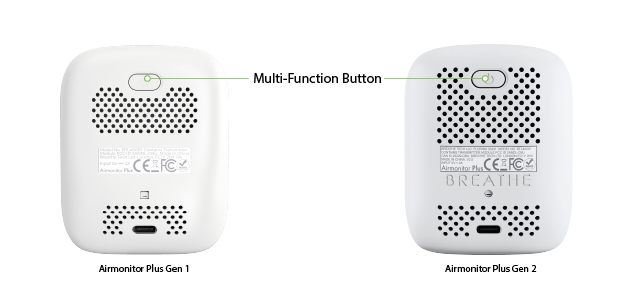
Option 1 – Silence the Alarm Using the Multifunction Button
- Locate the multifunction button on the rear of Airmonitor Plus.
- Press the button twice quickly.
- The audible alarm will be turned off.
Option 2 – Turn Off the Alarm in the Breathe Tech App
- Open the Breathe Tech app.
- Select Airmonitor Plus.
- Tap the Settings icon.
- Toggle Alarm Off.
Important: Turning off the Device Alarm does not disable notifications sent to your phone. App notifications are managed separately.
Device Alarm vs App Notifications
The audible alarm and app notifications are separate features.
- Device Alarm – Sounds an audible beep from Airmonitor Plus.
- App Notifications – Sends alerts to your smartphone.
You can disable either feature independently without affecting the other.
Can I Change the Alarm Thresholds?
Yes.
To change when the alarm is triggered:
- Open the Breathe Tech app.
- Select Airmonitor Plus.
- Tap the Settings icon.
- Tap CO₂ Alarm Level or PM2.5 Alarm Level.
- Move the slider to select your preferred alarm threshold.
- Tap Confirm to save your changes.
The selected thresholds apply to both the audible Device Alarm and App Notifications.
Was this article helpful?
That’s Great!
Thank you for your feedback
Sorry! We couldn't be helpful
Thank you for your feedback
Feedback sent
We appreciate your effort and will try to fix the article